Compliance vs Cybersecurity: Key Differences

Updated:
November 18, 2026
Compliance means meeting applicable requirements. Cybersecurity, on the other hand, refers to the techniques used to protect information, systems, and businesses from threats.
The two overlap through controls such as access restrictions, employee training, and incident response, but they serve different purposes. For instance, a compliance audit assesses defined controls against specific criteria, while daily security work detects threats and keeps protections effective as the business changes.
This guide explains their key differences and where they overlap.
Let’s jump right in!
What Is Cybersecurity?
Cybersecurity is the work of protecting information, systems, and operations from unauthorized access, harmful changes, disruption, and loss. It combines people, processes, and technology to reduce risks and recover when incidents occur.
Information security covers digital information and physical records. Cybersecurity focuses on digital systems, networks, and data. Their shared objectives also known as CIA include:
- Confidentiality: Limit access to people who are authorized to use the information.
- Integrity: Keep information accurate and protect it from improper changes.
- Availability: Keep information and services accessible when authorized users need them.
A security control is a safeguard that helps achieve these objectives. Technical controls include encryption and multifactor authentication, which requires more than one type of identity verification. Administrative controls include training and access approval procedures; physical controls include locked equipment rooms and visitor restrictions.
Security posture describes how well these protections address the organization’s current risks. It changes as the business adds systems, changes access, and responds to new threats.
“Security is a process, not a product.”
— Bruce Schneier
What Is Compliance?
Compliance is fulfilling the requirements that apply to an organization and being able to demonstrate that fulfillment. Those requirements come from laws, regulations, contracts, adopted standards, and internal policies.
In cybersecurity, this work includes identifying obligations, operating required safeguards, keeping evidence, and correcting failures. Broader compliance responsibilities extend into areas such as privacy rights and financial reporting.
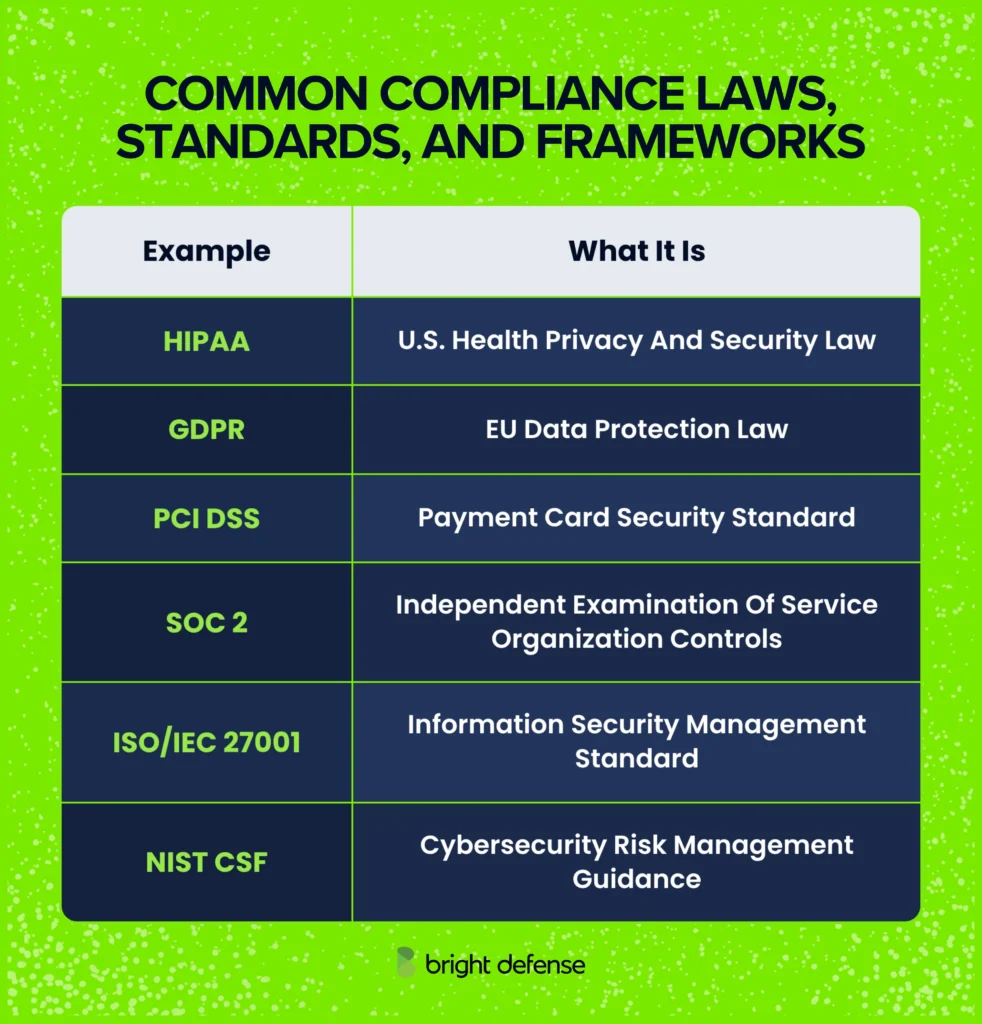
The following are some of the examples compliance frameworks that are commonly used:
Compliance Examples and Where They Apply
Compliance continues between assessments. Required activities, such as reviewing access or updating risk assessments, still need to happen when an auditor is absent.
Requirements differ in flexibility. ISO/IEC 27001 requires an information security management system suited to the organization’s risks and continuing improvement. Meeting that standard involves decisions about business context, responsibilities, and effective safeguards.
What Are the Main Differences Between Compliance and Security?
Compliance checks whether a business meets the requirements that apply to it. Security focuses on protecting information, systems, and operations from harm.
Their priorities often overlap, but they measure success in different ways:
Compliance and Security Compared
| Area | Compliance | Security |
|---|---|---|
| Main Goal | Meet Applicable Requirements and Provide Evidence | Reduce the Likelihood and Impact of Security Incidents |
| What Guides the Work | Laws, Contracts, Standards, and Company Policies | Threats, Weaknesses, Business Needs, and Acceptable Levels of Risk |
| What It Covers | People, Processes, and Systems Within the Requirements’ Scope | Information, Systems, Suppliers, and Other Dependencies That Affect Business Security |
| When Work Happens | Throughout the Year, With Assessments at Required Intervals or After Specific Changes | During Daily Operations, With Monitoring, Testing, and Responses to New Threats |
| How Results Are Checked | Evidence Reviews, Assessment Findings, and Completion of Corrective Work | Control Testing, Detection and Response Times, and the Ability to Restore Operations |
| Consequences of Failure | Corrective Work, Contract Disputes, Certification Problems, or Regulatory Action | Data Exposure, Downtime, Recovery Expenses, and Harm to Customers |
An employee leaving the company shows how the distinction works. A compliance review checks whether IT removed access within the required timeframe and retained evidence. Security teams check whether the former employee can still reach company systems through an active session, shared password, or overlooked account.
Both activities support the same outcome: ending access when it is no longer authorized. Compliance provides an accountable process, while security checks whether that process protects the business in practice.
The consequences can overlap. A breach investigation may reveal that required safeguards were missing or ineffective. Whether that leads to penalties depends on the applicable law and findings. Certification decisions and contractual consequences follow their own requirements.
How Do Compliance and Security Support Each Other?
Compliance sets expectations for protecting systems and data. Security puts those expectations into practice, while assessments check whether the work meets the requirements.
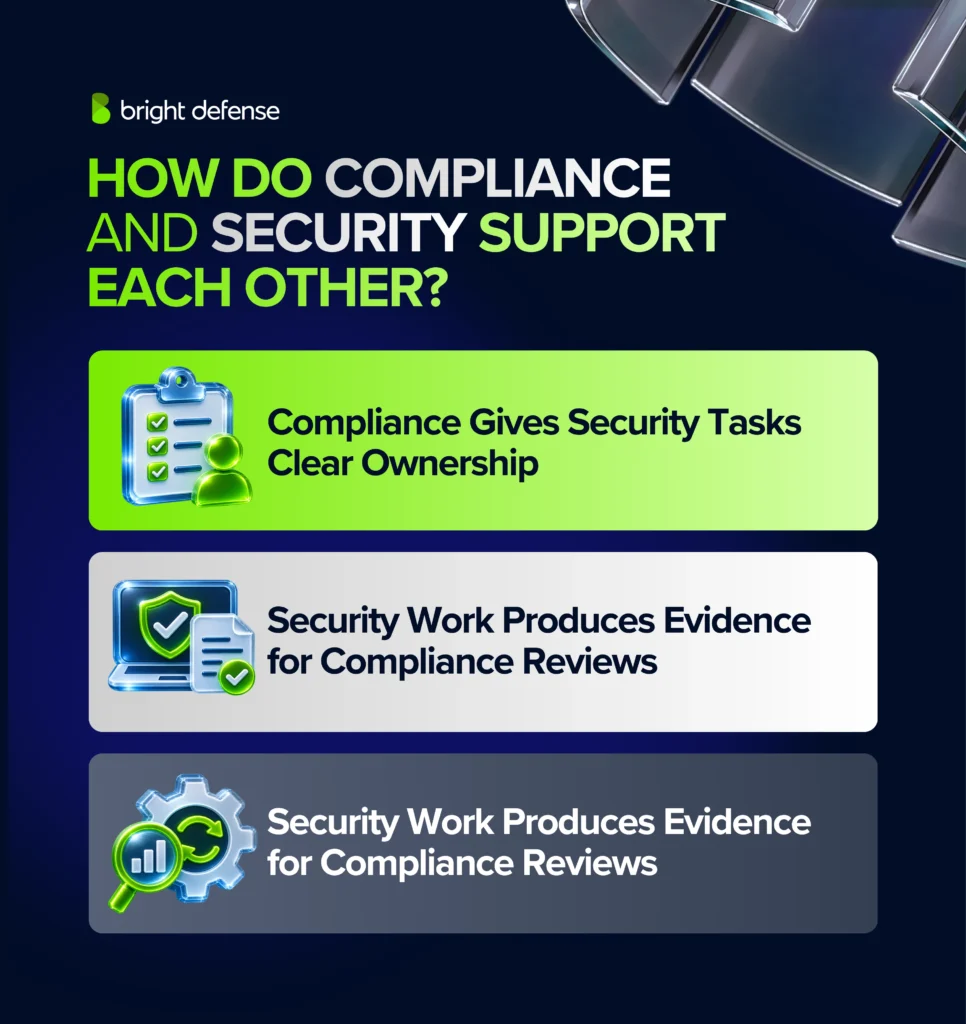
The following three connections show how they support each other:
1. Compliance Gives Security Tasks Clear Ownership
Compliance turns security requirements into assigned work with deadlines and management oversight. This helps teams keep recurring tasks on schedule when other priorities compete for attention.
A vendor review shows how this works. Before buying a service, procurement explains what the vendor will do, security checks its access and safeguards, and an authorized manager reviews the remaining risks. Assigning these responsibilities makes the review part of the purchasing process.
A requirement alone does not complete the work. Managers need to assign people, provide resources, and check progress.
2. Security Work Produces Evidence for Compliance Reviews
Completed security tasks produce records that help assessors check whether employees followed the required process. Saving these records during daily operations reduces the work of gathering evidence before an assessment.
When an employee leaves, HR communicates the departure and IT removes the employee’s access. A manager checks that the task is complete. The departure notice, service ticket, and account logs show when the request arrived and when access ended.
A policy explains what employees need to do. Completion records help demonstrate whether they did it within the required timeframe.
These records support both the compliance review and any investigation into access that remained active.
3. Assessments Turn Weaknesses Into Corrective Work
Assessments expose gaps between the required process and what happens in practice. Teams can use the findings to assign corrective work and check whether the changes solve the problem.
During an incident response exercise, employees might discover that the emergency contact list includes people who have left. That finding shows why maintaining the list matters during a real incident.
Updating the contacts addresses the immediate problem. Assigning someone to maintain the list and testing the notification process reduces the chance of the same failure happening again.
Why Doesn’t a Compliance Report Guarantee Security?
A compliance report evaluates controls within a defined scope and timeframe. Systems, employees, and threats continue to change after the assessment ends.
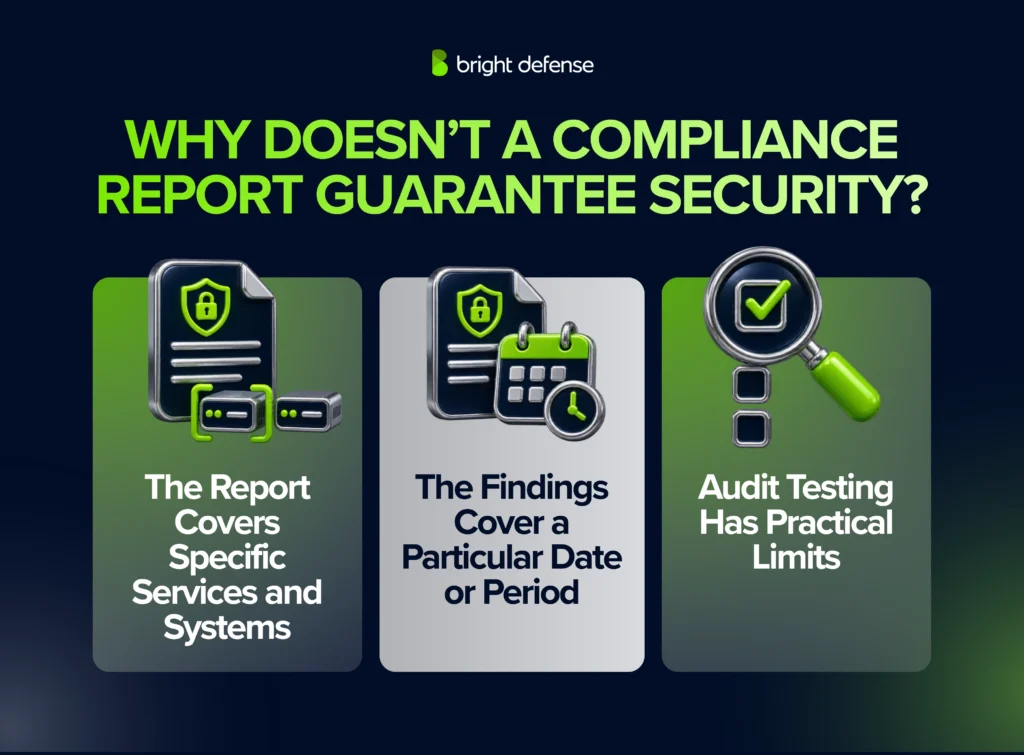
The following three limits explain what a report can tell you about security:
1. The Report Covers Specific Services and Systems
A report provides assurance about the services and systems included in the assessment. Other products, locations, or business activities require their own review.
A company’s report might cover its payroll application while excluding a separately operated product acquired later. A customer buying that newer product needs to confirm whether the report covers the service they will use.
Check the system description and assessment boundaries before relying on the findings. Systems that materially support the assessed service need appropriate consideration within the assessment.
2. The Findings Cover a Particular Date or Period
A report reflects the controls examined during its stated timeframe. Changes after that timeframe can introduce weaknesses that the assessment never examined.
SOC 2 reports illustrate this distinction:
- Type 1: Evaluates the system description and suitability of control design as of a specified date.
- Type 2: Includes testing whether controls operated effectively throughout a specified period.
A new integration could give a supplier access to customer records after the examination period ends. The company needs to review that access, apply appropriate safeguards, and retain evidence of the change. Maintaining security continues between examinations.
3. Audit Testing Has Practical Limits
Auditors use evidence, walkthroughs, and testing to evaluate controls against defined criteria. Testing may involve samples, which means the auditor examines selected activities to support a conclusion about the control.
Reviewing software change approvals helps an auditor assess whether employees followed the release process. Penetration testing investigates whether someone could exploit weaknesses in the application. These activities answer different questions, and each has limits.
A completed assessment gives customers useful information about the controls examined. Ongoing monitoring, technical testing, and incident response remain necessary to identify weaknesses and respond when safeguards fail.
“Adequate security cannot be based solely on individual efforts, such as performing functional testing, demonstrating compliance, or conducting adversarial penetration tests.”
— Ron Ross, discussing security functionality and assurance. www.linkedin.com
Can Strong Security Still Leave Compliance Gaps?
Yes. A business can operate effective security safeguards while missing required contracts, records, notices, or procedures. Those obligations need their own checks.
Consider a hypothetical healthcare provider covered by HIPAA that hires a billing company handling protected health information as its business associate. The companies restrict access, encrypt the information, and maintain reliable backups, but they fail to execute the required business associate agreement.
Their technical protections do not fulfill the missing contractual obligation. A business associate agreement addresses matters such as permitted information use, safeguards, incident reporting, and responsibilities when the relationship ends.
Similar gaps arise when a company completes a required review but cannot produce the records needed to demonstrate it. Retaining approvals, review results, and corrective actions helps connect the work to the requirement.
Include contractual and evidence obligations in the compliance review alongside technical safeguards. Assign each obligation to someone with the authority and knowledge to complete it.
How Can You Align Compliance and Security?
Connect each compliance requirement to a safeguard that protects the business. Give someone responsibility for running that safeguard, test whether it works, and keep evidence of the result.
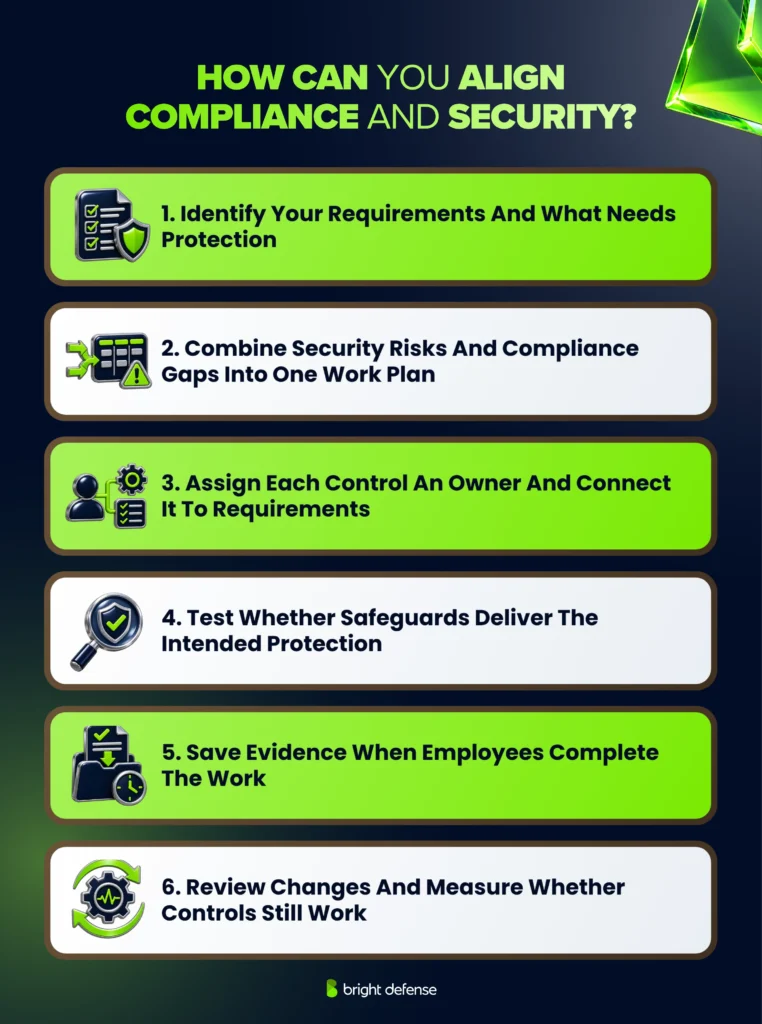
The following six steps bring this work into one program:
1. Identify Your Requirements and What Needs Protection
Start by listing the requirements your business must meet and the systems and information they affect. This keeps compliance planning connected to how the business operates.
Review relevant laws, customer contracts, adopted standards, and company policies. Then trace sensitive information through your applications, cloud services, suppliers, and employees. Record where it is stored, who can access it, and where it is shared.
Use this information to define the program’s scope. Clarifying which services and obligations are included helps you choose appropriate safeguards and avoid purchasing unnecessary tools.
2. Combine Security Risks and Compliance Gaps Into One Work Plan
A security risk assessment examines what could go wrong and how it would affect the business. A compliance gap assessment checks which requirements remain unmet. Reviewing both gives teams a clearer basis for assigning corrective work.
A security assessment can examine exposed systems, excessive access, and unsafe configurations. Compare those findings with required controls and deadlines.
Record the action, owner, and completion date for each issue. Address urgent exposure promptly and schedule required work before its deadline. Management’s acceptance of a security risk does not remove a legal or contractual obligation.
3. Assign Each Control an Owner and Connect It to Requirements
Clear ownership prevents tasks from falling between departments. For each safeguard, name the person responsible for operating it, the reviewer, and the person who handles problems.
Control mapping connects that safeguard to the requirements it supports. An HR training process could support multiple frameworks when the course content, employee coverage, and completion records meet their requirements.
Keep these connections in a shared register. Teams can then check existing work before creating another process or requesting the same evidence again.
4. Test Whether Safeguards Deliver the Intended Protection
Putting a safeguard in place is only part of the work. Testing shows whether it performs its intended function in your environment.
A backup job marked “successful” gives limited information about recovery. Restoring a representative workload lets the team check whether the data is usable and whether recovery finishes within the business’s target time.
Match the test to the safeguard. Configuration checks verify settings, incident exercises test response procedures, and penetration testing examines exploitable weaknesses. Record failures, assign corrective work, and retest the affected control.
5. Save Evidence When Employees Complete the Work
Collecting records during everyday operations reduces the need to reconstruct events before an assessment. Make saving evidence part of the task’s completion criteria.
For a software release, this could mean retaining the approval, test results, and deployment record together. Each record needs enough context to identify the system, responsible person, and relevant date.
Use a controlled location for compliance evidence. Automated collection reduces manual exports, while human review checks that the records are complete, relevant, and cover the intended systems or users.
6. Review Changes and Measure Whether Controls Still Work
Changes to products, suppliers, systems, or requirements can make existing safeguards incomplete. Review the affected controls when those changes occur and update their owners, tests, and evidence needs.
Management needs visibility into both unmet requirements and security performance. Track overdue required reviews alongside results such as recovery times, unresolved weaknesses, and response to alerts.
Control Performance and Evidence Tracker
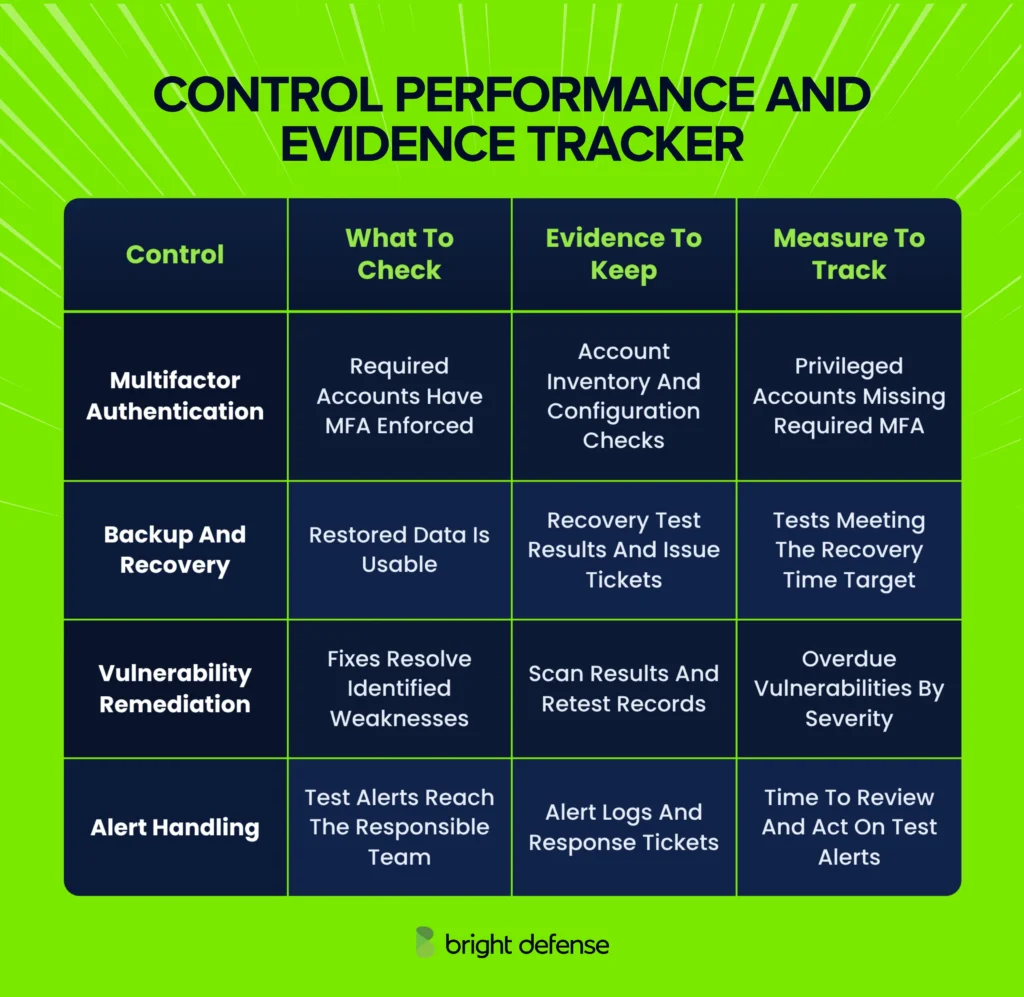
Review missed targets and unresolved findings with the responsible owners. Closing a task requires evidence that the corrective work addressed the problem.
How Can Bright Defense Help with Compliance and Security?
Bright Defense helps businesses connect compliance preparation with ongoing security work. The team’s services include gap analysis, risk assessments, policy development, remediation support, and virtual chief information security officer (vCISO) guidance.
The work starts with understanding the organization’s requirements and current safeguards. A readiness roadmap turns the gaps into assigned tasks, while evidence management and control monitoring help teams maintain the program between assessments.
Bright Defense’s penetration testing services examine web applications, application programming interfaces (APIs), and networks for exploitable weaknesses. Findings include remediation guidance and retest support, giving technical teams a path from identifying a problem to checking the fix.
The appropriate engagement depends on your systems, required assessments, and internal capacity. Confirm the selected plan’s scope, testing coverage, and audit arrangements when planning the work.
Talk to Bright Defense about continuous cybersecurity compliance to connect your requirements, security controls, and assessment preparation.
Frequently Asked Questions
1. Who Is Responsible for Security and Compliance in a Small Business?
Leadership remains accountable, while named employees or service providers perform the work. A small business can assign coordination to an IT lead or vCISO, with human resources, procurement, and legal support handling their respective responsibilities. Give each recurring task an owner and someone authorized to resolve problems.
2. Does Every Business Need an Independent Compliance Audit?
No. The need for an independent audit depends on applicable requirements, customer contracts, and the assurance the business chooses to obtain. Some eligible payment businesses use PCI DSS self-assessment questionnaires; a SOC 2 report requires an independent examination.
3. Is SOC 2 a Certification?
No. SOC 2 is an assurance examination that results in a report from an independent certified public accountant (CPA) firm. The AICPA’s SOC services provide information about controls that customers use when evaluating service providers.
4. Does Outsourcing IT Transfer Compliance Responsibility?
No. Outsourcing changes who performs particular tasks, while your organization retains the responsibilities that apply to its role. For example, merchants that outsource payment processing retain duties involving provider oversight, written agreements, and shared responsibilities.
5. What Happens When an Auditor Finds a Control Failure?
The auditor evaluates the failure’s significance and its effect on the assessment. Your team investigates the cause, assigns corrective work, and preserves evidence of the response. Confirm how the finding affects the assessment outcome and what follow-up testing is needed.
6. Does a Cloud Provider’s Compliance Cover Its Customers?
No. A provider’s report or certificate covers the specified services and scope. Customers still need to evaluate their own configurations, user access, information handling, and any controls the provider expects them to operate.
7. Can a Penetration Test Replace a Compliance Audit?
No. A penetration test examines whether weaknesses in a defined environment can be exploited. A compliance audit evaluates applicable requirements, which can include governance, personnel practices, policies, and operational records beyond the test’s scope.
8. Is Compliance Software Necessary for a Small Business?
A dedicated compliance platform is optional unless a specific requirement or contract mandates it. A small business can manage tasks and evidence with controlled records, an ownership list, and a review schedule. Software becomes useful when integrations, recurring requests, or multiple assessments create substantial manual work.
9. How Long Do Businesses Need to Keep Compliance Evidence?
Retention depends on the record type and applicable legal, contractual, or framework requirements. For example, the HIPAA Security Rule requires specified compliance documentation to be retained for 6 years from creation or the date it was last in effect, whichever is later. Apply the relevant retention rule to each record category, including any required preservation for an investigation or dispute.
10. Does a Compliance Certificate or Report Expire?
Certificates have validity and maintenance conditions; assurance reports describe findings for a particular date or period. Management system certificates identify an expiry or recertification date. A SOC 2 report remains a historical report, while customers decide how recent the evidence must be for their review.