SOC 2 Password Requirements for 2026

Updated:
October 15, 2026
SOC 2 password requirements are the authentication controls an organization uses to protect access to its systems and data. The AICPA’s Trust Services Criteria guide the assessment; each organization selects and enforces controls suited to its services and access risks.
27.2% of initial-access activity in Google Cloud’s observed H2 2025 dataset involved weak or absent credentials, down from 47.1% in H1. Google Cloud’s H1 2026 Threat Horizons report shows software exploitation overtaking credential issues.
Password protections remain necessary alongside patching and secure configuration; these figures describe a subset of observed Google Cloud activity.
A password policy supports SOC 2 requirements when its rules address relevant risks, are enforced across in-scope systems, and are supported by evidence. Password length, compromised-password blocking, MFA, secure storage, and account recovery all contribute to that assessment.
This guide provides a recommended password baseline, explains the relevant SOC 2 criteria, and shows how to retain evidence of enforcement.
What Password Baseline Can You Use For SOC 2?
Use this starting point to turn your password policy into measurable settings. NIST rows summarize its digital identity guidance. Suggested policy settings are recommendations for your organization to evaluate and adopt based on its systems, risks, and commitments.
| Control | Recommended Baseline | Basis |
|---|---|---|
| Password-only access | Minimum 15 characters | NIST requirement |
| Passwords used only with MFA | Minimum 8 characters; longer passwords remain an option | NIST requirement |
| Password screening | Check common, expected, and compromised values at every password creation and change | NIST requirement |
| MFA coverage | Require MFA for admin accounts, remote access, email, and production access; prefer phishing-resistant methods | Suggested policy setting |
| Failed attempts | Apply throttling early. NIST’s default ceiling is 100 consecutive failures for a specific authenticator on one account, then disable that authenticator; some types have stricter limits | NIST ceiling, not a target threshold |
| Screen locking | Lock managed endpoints after no more than 15 minutes of inactivity; shorten for higher exposure | Suggested policy setting |
| Offboarding | Disable IdP and application access at the effective end of employment or authorization; revoke sessions and tokens | Suggested policy setting |
| Privileged access reviews | Review at least quarterly and after role changes; increase frequency for higher-risk access | Suggested policy setting |
How Do SOC 2 Criteria Apply To Password Controls?
CC6 covers logical and physical access. The criteria below connect authentication with credential issuance, permissions, and external access. The evidence column gives examples of what an auditor may examine; the engagement’s scope determines the actual procedures.
These controls support the SOC 2 Trust Services Criteria and help make access decisions traceable.
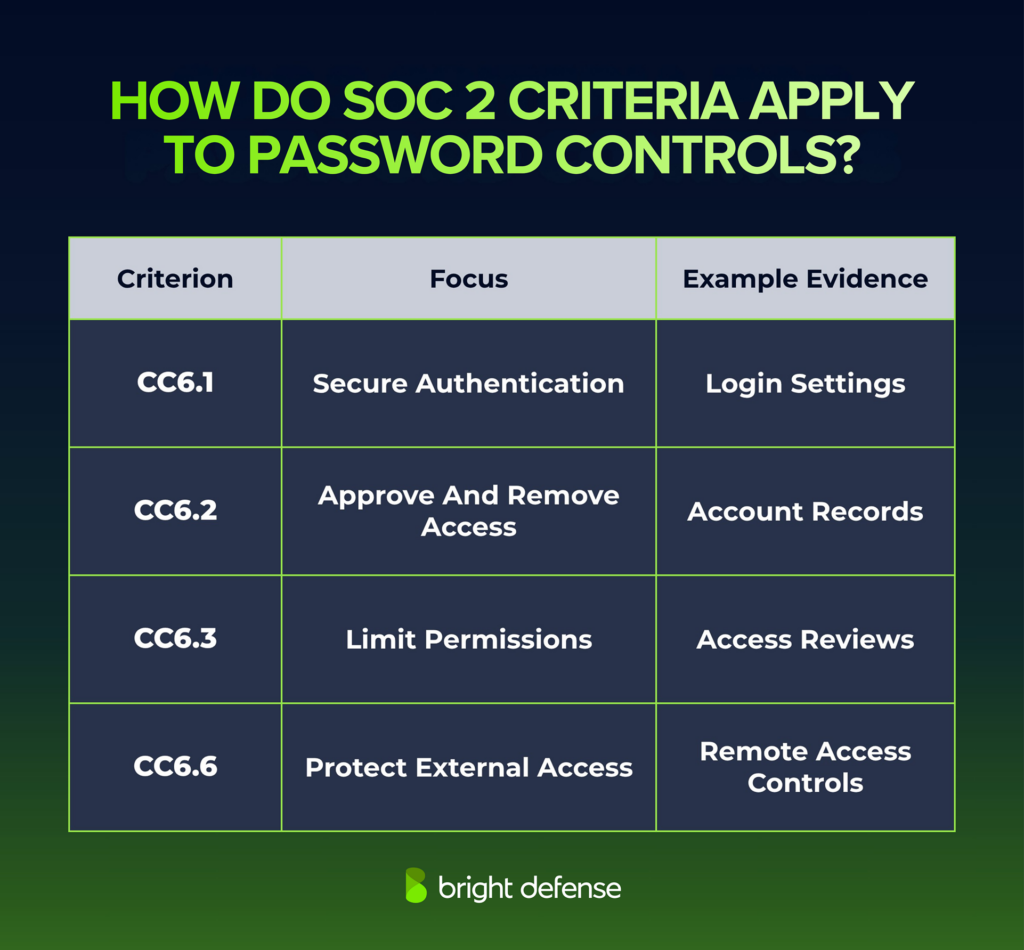
CC6.6’s points of focus include additional authentication for access from outside system boundaries. MFA can support this objective. Points of focus help explain the criteria and are not a separate configuration checklist.
How NIST Guidance Informs Your Password Policy
NIST SP 800-63B-4 covers centrally verified passwords. Use the baseline above for length, screening, and failed attempts, then apply these supporting provisions:
- Longer Passphrases: Allow a maximum password length of at least 64 characters, as NIST recommends.
- Complexity Rules: Do not require mixtures of uppercase letters, lowercase letters, numbers, and symbols.
- Password Changes: Do not force routine periodic changes. Require a change when there is evidence of compromise.
- Password Managers: Allow password managers and autofill. NIST recommends permitting paste functionality.
- Secure Storage: Use a suitable salted password hashing scheme that resists offline attacks.
- Protected Transmission: Use encryption and an authenticated protected channel when requesting passwords.
- Hints And Security Questions: Do not expose password hints to unauthenticated users or prompt users to set security questions when choosing passwords.
Device PINs used locally to activate an authenticator and machine credentials have different requirements. Match each control to the credential’s function.
Why Do Password Controls Matter For SOC 2?
Password controls help reduce unauthorized access and provide evidence that your security policies operate in practice. Their value extends across prevention, oversight, and incident response.
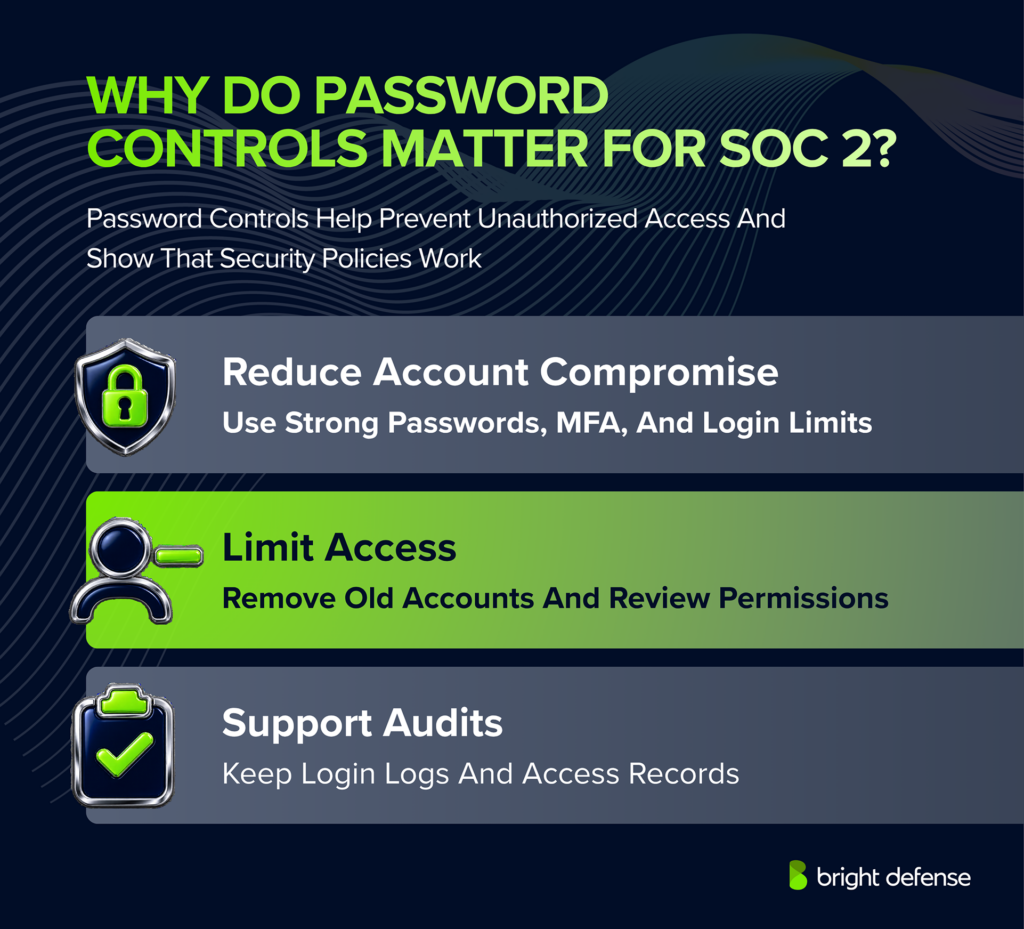
Reduce Account Compromise
Long passwords, compromised-password screening, and login rate limiting reduce exposure to guessing attacks. MFA adds protection when an attacker obtains a password. NIST treats passwords themselves as non-phishing-resistant.
Limit Unauthorized Access
Account removal and permission reviews help prevent former employees, contractors, or users with outdated privileges from retaining access. Strong authentication works alongside these controls to protect sensitive systems.
Support Investigations And Customer Assurance
Individual accounts and authentication logs help teams investigate suspicious activity. Configuration records, access approvals, and revocation evidence help demonstrate how your controls operate during a SOC 2 examination.
Where Do SOC 2 Password Controls Apply?
Apply authentication controls wherever users can access systems within your SOC 2 scope. Review these common access points:
- Identity providers and SSO platforms
- VPNs and remote access services
- Cloud consoles and production administration tools
- Code repositories and CI/CD platforms
- Databases and data warehouses
- Endpoint devices and local administrator accounts
- Security, HR, finance, and support applications within scope
- Vendor, emergency-access, and shared accounts
Distinguish user passwords from service-account secrets, API keys, and device access PINs. These credentials need controls suited to their function; NIST’s centrally verified password rules do not apply identically to every credential.
Best Practices For Meeting SOC 2 Password Requirements
Effective password security combines clear policies, technical enforcement, and evidence that controls operate consistently. The following practices help organizations protect credentials and support SOC 2 examinations across their in-scope systems.
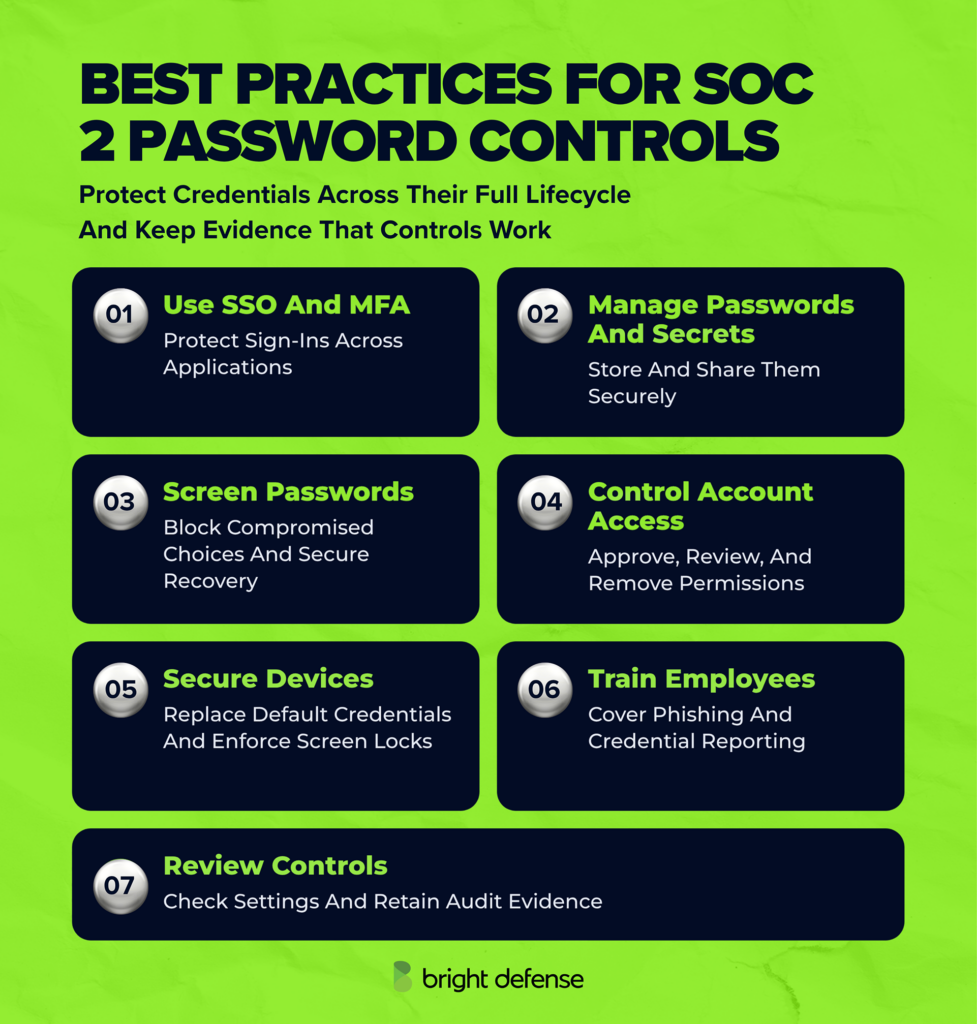
1. SSO And MFA Enforcement
99.22% lower account-compromise risk was observed among accounts using MFA in Microsoft’s 2023 study. This finding supports broad MFA deployment. Prioritize phishing-resistant methods for sensitive access.
Connect supported applications to an SSO platform to centralize authentication, apply consistent policies, and monitor sign-ins. Check whether applications still permit direct access through local credentials, and disable unnecessary alternative login methods.
Require MFA according to your access policy, prioritizing administrative accounts, remote access, email, and sensitive systems. Prefer phishing-resistant methods, such as FIDO2 security keys or appropriately configured passkeys, where supported.
Review MFA exclusions and protect authenticator enrollment and replacement procedures. Test offboarding across connected applications because disabling an SSO account may leave application sessions, local accounts, or API tokens active.
2. Password Managers And Secrets Protection
A business password manager gives employees a controlled place to generate and store unique credentials. Define vault access, sharing, recovery, and employee-departure procedures.
Restrict shared vaults by role and protect access with strong authentication. When someone leaves, assess whether shared passwords need changing: removing vault access does not erase credentials they previously copied.
Manage service-account passwords, API keys, and application secrets through an appropriate secrets-management system. Assign owners, restrict permissions, and define rotation procedures that account for application dependencies. Keep secrets out of source code, chat messages, and support tickets.
3. Compromised Password Screening And Recovery
Password screening belongs in account creation and reset workflows. Use supported integrations that check common, expected, and compromised values while protecting credential confidentiality.
Define how your team responds to suspected exposure, including investigation, password resets, session revocation, and account review. Exposure-monitoring services can provide useful alerts, but their coverage is incomplete. NIST requires password changes when there is evidence of compromise.
Protect password resets and MFA recovery with identity-verification procedures. For applications you build, use recovery links or codes that expire and become invalid after use. Apply additional scrutiny to privileged accounts and requests to change recovery contact details.
4. Account Lifecycle And Permissions
Access approval connects each credential to an authorized user and purpose. Assign permissions by job responsibilities, review them after role changes, and remove access when authorization ends.
Include application accounts, active sessions, tokens, password-manager access, and shared credentials in offboarding procedures. Assign responsibility for each system so applications outside SSO are covered.
Use separate administrative accounts where appropriate. Emergency-access accounts should have protected credentials, named owners, monitoring, and a defined testing process. Set access-review intervals and removal deadlines according to risk and your commitments.
5. Device And Default Account Security
New-system setup is the point to remove shared factory credentials and disable unnecessary default accounts. Include this check before devices, databases, or applications enter production.
Enforce automatic screen locking through endpoint management and require authentication to access devices. Choose inactivity settings appropriate to the working environment and the information accessible from the device.
Monitor whether in-scope devices receive the required settings. Assign an owner to investigate configuration failures and retain records showing their resolution.
6. Employee Training For Credential Attacks
More than 145 million QR-code phishing attacks were detected by Microsoft Defender for Office 365 between July 2025 and June 2026, as described in Microsoft’s Digital Defense Report 2026. Include QR-code lures in training and teach employees to inspect the destination before entering credentials.
Security awareness training covers password reuse, phishing pages, unsafe credential sharing, and suspicious recovery requests. Teach employees to reject unexpected authentication prompts and report them immediately.
Show employees how to use the approved password manager and report suspected credential exposure. Provide additional training for help-desk staff and administrators who can reset passwords or replace authentication factors.
Retain completion records and follow up on missed training. Update examples when authentication tools or attack patterns change.
7. Control Reviews And Audit Evidence
Configuration reviews reveal whether system settings still match your policy. Repeat them after significant platform changes and track corrective actions through completion.
For systems that cannot support your baseline, record the limitation, risk, approval, and compensating protections. Assign each exception an owner and a review or expiry date.
Collect evidence throughout the examination period. A screenshot taken at the end of a SOC 2 Type 2 period cannot, by itself, demonstrate consistent enforcement throughout that period.
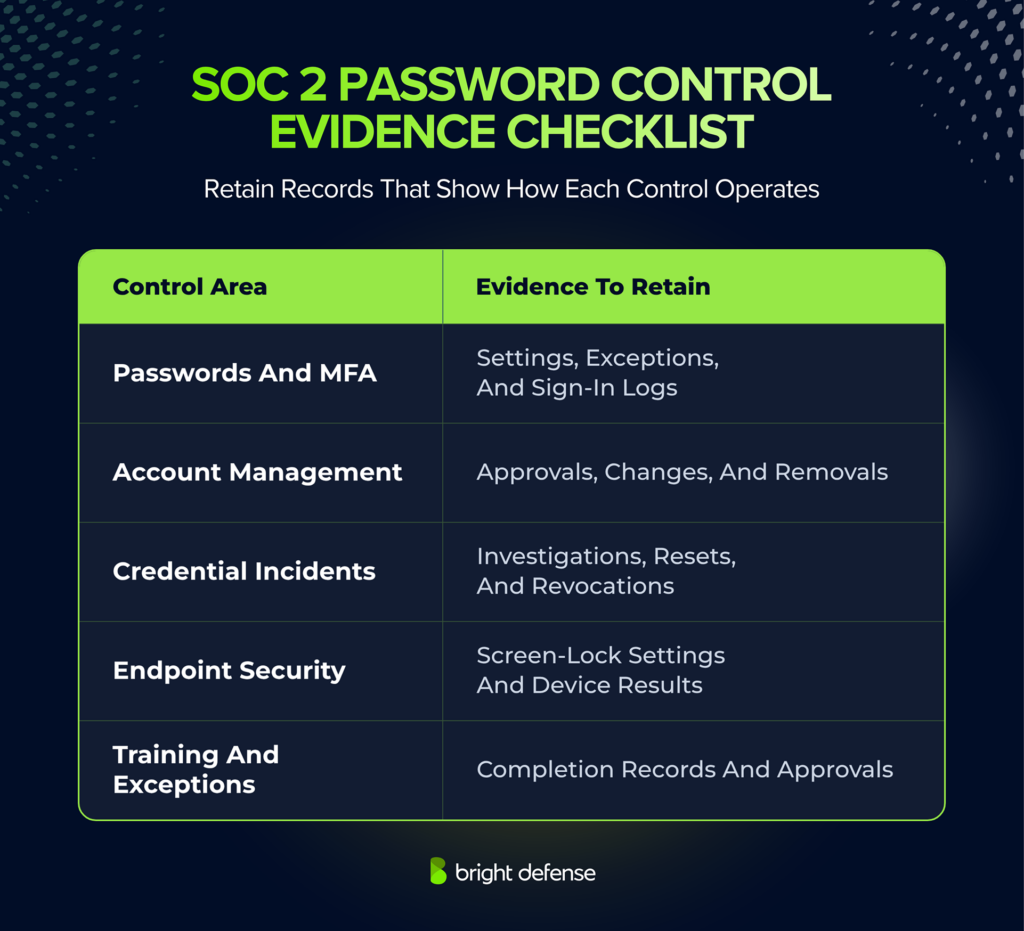
Keep evidence dated, attributable to the relevant system, and free of actual passwords or recovery secrets. Compliance automation can help collect records and flag changes, while control owners investigate gaps and complete remediation.
Explore our password statistics to understand how password reuse, weak credentials, and authentication practices affect account security.
How Can Bright Defense Strengthen Your SOC 2 Password Controls?
Bright Defense helps organizations turn password and access policies into enforceable security practices. Our SOC 2 services support readiness, remediation, and evidence preparation across the systems included in your examination.
Our team helps you assess control gaps, develop policies that reflect your risks, and prioritize corrective actions. For password security, this means connecting authentication requirements with account management, employee responsibilities, and evidence of enforcement.
Through our continuous compliance services, we manage compliance automation, monitor control status, organize evidence, and track remediation. Ongoing support helps your team maintain controls as employees, applications, and access needs change.
Our managed security awareness training supports safer employee behavior through security education and phishing awareness. This complements the technical safeguards protecting your accounts.
Explore our SOC 2 services to build a practical plan for stronger authentication controls and audit readiness.
Frequently Asked Questions About SOC 2 Password Requirements
1. Do I Need A Specific Password Policy To Pass A SOC 2 Audit?
SOC 2 does not provide a mandatory password-policy template. Set authentication rules that address your risks, systems, and service commitments. Explain enforcement and exception handling in the policy, and retain evidence of the supporting controls.
2. Can I Use Eight-Character Passwords With MFA?
Only when the password is used exclusively within MFA, as described in the baseline table. Check recovery and fallback login paths before relying on that shorter minimum.
3. Do I Have To Change Passwords Every 90 Days?
No fixed SOC 2 schedule applies. Use the NIST guidance above for user passwords, and define separate handling for exposed shared secrets and machine credentials. Retain records showing how reset events are investigated and resolved.
4. Can I Meet SOC 2 Requirements Without MFA?
The answer depends on whether your controls address the relevant access risks and commitments. For the baseline in this article, require MFA on sensitive and privileged access. Record any exceptions, compensating protections, and remediation deadlines.
5. Do I Need A Password Manager For SOC 2?
SOC 2 does not mandate a password manager or a particular product. A business password manager can support unique passwords, controlled sharing, and employee offboarding.
A provider’s SOC 2 report offers evidence about its controls. Your organization remains responsible for configuring the password manager, managing access, and retaining evidence of use.
No. Applications may retain local accounts, emergency logins, or authentication methods that bypass SSO. Check these access paths and confirm that disabling an SSO account produces the intended result. Existing sessions and tokens may require separate revocation.
Disable the employee’s accounts and revoke access when authorization ends. Rotate shared passwords and secrets that could permit continued use. Other employees’ individual passwords generally need no reset solely because someone leaves.
Plain SHA-256 is unsuitable for password storage because it allows rapid guessing. Use a purpose-built password hashing scheme, such as Argon2id, with appropriate settings and unique salts.
PBKDF2-HMAC-SHA-256 is a different construction that deliberately increases the cost of guessing. OWASP includes it among its recommendations, particularly where FIPS-140 compliance is required.
Record the limitation, affected accounts, risk, and approved exception. Assess compensating protections such as restricted network access, stronger authentication through an access gateway, or additional monitoring.
Assign an owner and a remediation or review date. An approved exception still needs evidence that the remaining risk is appropriately managed.
Retain authentication settings, MFA policies, relevant logs, access approvals, offboarding records, and exception reviews. Evidence should show the system, applicable users, and collection date.
For a SOC 2 Type 2 examination, maintain records throughout the examination period. Keep actual passwords, recovery codes, and other usable secrets out of audit evidence.
Sources
- NIST — SP 800-63B-4 — Password requirements and recommendations; Section 3.2.2 explains rate limiting and the default 100-attempt ceiling.
- Google Cloud — Threat Horizons H1 2026 — The decline from 47.1% to 27.2% concerns weak or absent credentials in a subset of observed Google Cloud initial-access activity.
- Microsoft Research — MFA Effectiveness Study (2023) — Source for the 99.22% reduction in compromise risk in the study population.
- Microsoft — Digital Defense Report 2026 — Source for more than 145 million QR-code phishing attacks detected by Defender for Office 365 from July 2025 through June 2026.
- OWASP — Password Storage Cheat Sheet — Technical recommendations for password hashing and salts.
- Criteria reference: AICPA, 2017 Trust Services Criteria With Revised Points Of Focus (2022), CC6.1, CC6.2, CC6.3, and CC6.6.